Collections
Collections represent the curatorial and provenance-historical structure of an institution (e.g. an estate, a modern-art collection, a sub-holding of graphic works). In Katalon they are a standalone primary type with full schema, hierarchy, and subtype support.
Management happens in the admin UI under Collections.
Structuring collections and holdings
Section titled “Structuring collections and holdings”- Open the admin UI and select Collections in the main menu.
- Click New collection in the collection list.
- Enter title, unique ID number, and desired metadata.
- For hierarchical holdings, select the parent node via the Parent collection field (e.g. Müller holding → Photographs sub-holding → Portraits series).
The collection list (#collections-list) automatically displays hierarchical collections indented as a tree view, as long as no filter, search, or manual sorting is active.
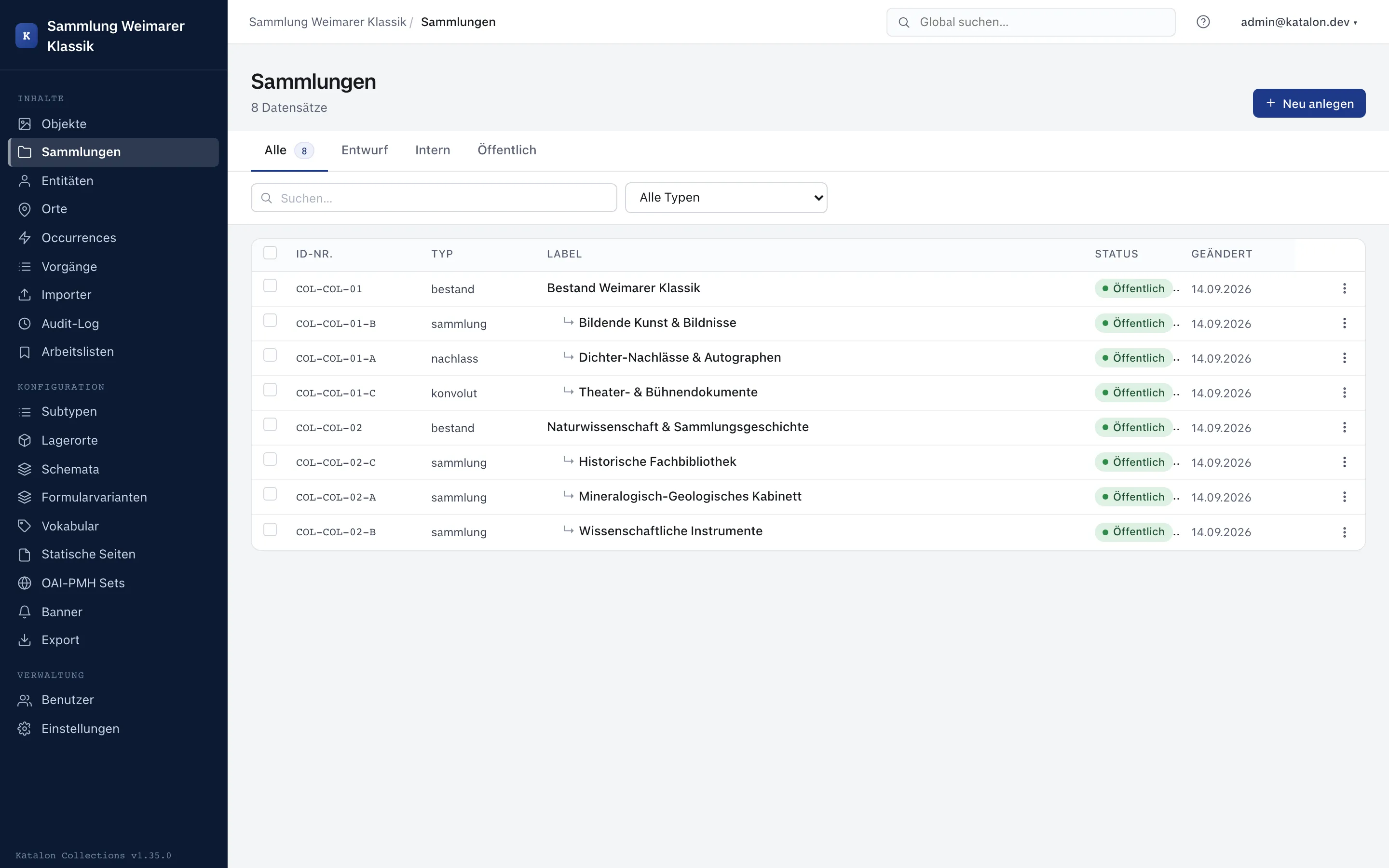
When moving or reparenting a collection via the Parent collection field, Katalon prevents cyclical dependencies (a collection cannot become its own child).
Schemas and subtypes for collections
Section titled “Schemas and subtypes for collections”Like all primary types, collections use the Katalon schema engine:
- Custom schema fields: Under Configuration → Schemas for the Collections type, any additional fields can be defined (e.g. accession date, provenance note, legal restrictions).
- Subtypes: Under Configuration → Subtypes, collection subtypes can be created (e.g. sub-holding, lot, estate) to use field-specific schemas or form variants.
Assigning objects to a collection
Section titled “Assigning objects to a collection”The link between objects and collections is made directly during object cataloging:
- Open the object record in the editor.
- The Collection field appears in the object form as soon as at least one collection exists in the system.
- Select the desired collection and save.
Technically, the link is stored as a member_of relation in the relations table. An object can therefore also belong to multiple collections.
Note on terminology: The
collection_statusfield on objects is called Holding status in Katalon, to clearly distinguish it from curatorial Collections.
Search and portal
Section titled “Search and portal”Collections are full-text indexed like objects, entities, places, and occurrences, and can be quickly found via search. Published collections are also available in the portal.